Unearthed · Reading guides
Updated
Bring Kindle and KOReader highlights into Craft
Use Unearthed Local to export your Kindle and KOReader highlights to Craft. Each book gets a page with its quotes and your notes, organised in a Sources collection. You can also add notes on articles, films, videos or anything else you’ve read, watched or listened to. Craft export is available in Local.
Connect your reading library to Craft
Local uses the same highlight templates for Craft and Obsidian exports. You can use Craft, Obsidian or both.
- Install Unearthed Local and import Kindle highlights or connect the KOReader plugin.
- In Craft’s Imagine or Connections area, create an authenticated All Documents / Space API connection. This gives Unearthed access to create the folders and collections for your library.
- Open Local’s Craft settings and paste the connection URL and API token. Select Test Connection, choose a folder name for your reading notes, then save.
- Export a book or article and open it in Craft to see how your templates look.
- Turn on article content if you want the full saved article copied to Craft as well as your highlights.
Documentation and links
What appears in Craft after an export?
By default, Local creates a folder called Unearthed with Sources and Authors collections inside. The Sources collection holds your books, articles and videos. Open an entry to see its highlights, notes and, if enabled, the full article. You can also turn off combined sources to give each media type its own collection document.
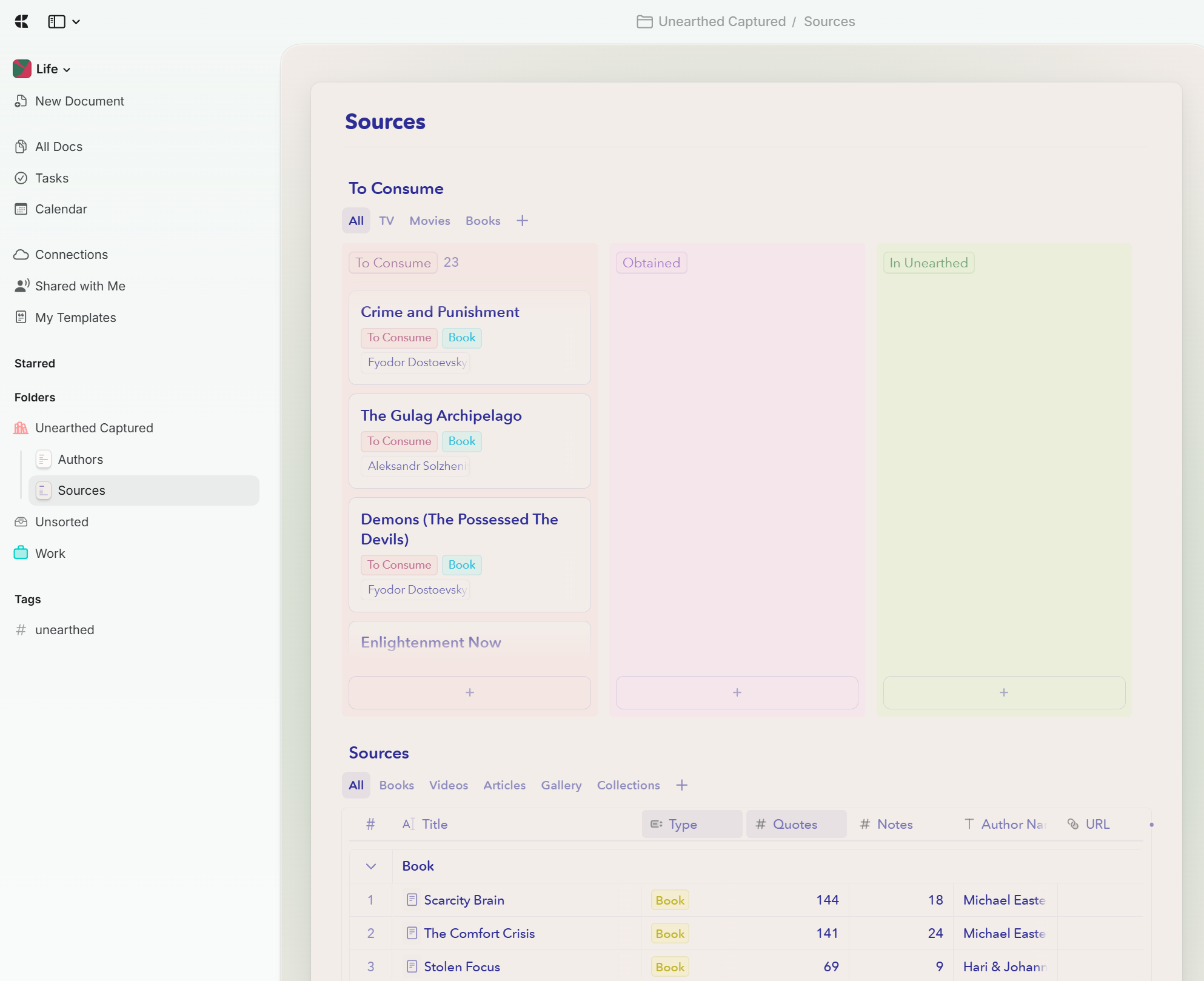
- The Quotes and Notes columns show how many entries each source contains. Open the source to read them.
- Author Name is stored as text. If you want to link it to an Author entry, the optional relation may need setting up in Craft.
- Use Local’s export templates and colour settings to change the layout inside each page.
Optional example: a recommendations board in Craft
Here’s one way to make the Sources page your own. This library uses a folder called Unearthed Captured, with Authors and Sources inside it. Above the exported table is a To Consume board for recommendations. The board was added by hand in Craft; it’s an optional addition, and Unearthed’s export works without it.
- The board keeps recommendations together, with views for TV, movies and books. Crime and Punishment and The Gulag Archipelago are waiting in To Consume.
- The columns track To Consume, Obtained and In Unearthed. You can choose your own statuses and move cards as you go; Unearthed doesn’t update the board.
- The table below holds the exported library, grouped by type. Scarcity Brain has 144 quotes and 18 notes here, ready to open and revisit.
Keep short notes on everything you read, watch and listen to
You can use Unearthed as one place for the quotes and thoughts you want to keep from books, films, TV shows, videos, articles and music. In this example, recommendations stay on the Craft board until you start them or decide they belong in your library. Unearthed then holds the things you’re spending time with and the notes you take along the way. You can read supported content in Unearthed, or watch, read and listen elsewhere and add your notes afterwards.
- Keep a recommendation on the optional Craft board, or add it straight to Unearthed.
- When you start something, commit to it or finish it elsewhere, add it as a source in Unearthed. Import highlights from supported Kindle and KOReader books, or add quotes and notes manually for other media.
- Save the passages, lines and observations you want to remember under that source. You don’t need to store or play the original media in Unearthed.
- Export to Craft to add those quotes and notes to your Sources collection. If you’re using a board, move the recommendation to In Unearthed yourself.
- Come back to the Sources page to reread your notes or choose something new from your recommendations.
Send articles to Craft too
Local can keep RSS articles and saved web reading alongside your book highlights. You can export the full article to Craft as well as the passages you highlighted.
What you need for Craft export
You’ll need Unearthed Local and a Craft space with an authenticated All Documents / Space API connection. Craft lists API access on both Free and Plus, though the Free plan has content and storage limits. Check those limits against the size of your library before exporting. Your original Unearthed library stays on your computer, with a copy of the exported content in Craft.
Documentation and links
If Craft connects but the export does not appear
Make sure the connection URL and token came from the same Craft connection, and that you chose All Documents / Space access. Look for the folder name saved in Local’s settings and check whether you’ve reached Craft’s content limit. Try exporting one source and read the result shown in Local before retrying the rest.
How updates work
Local keeps track of the highlights it has sent to Craft and adds new ones on later exports. It doesn’t send changes from Craft back to Kindle, KOReader or Unearthed. Editing a note that has already been exported in Local also won’t automatically replace its Craft copy.